Jun 072012
 

Time for some Microsoft bashing… err… promoting! Yup, I don’t do that too often, for obvious reasons, in my opinion.

There are plenty of apps out there which let Android users automate tasks, performing their pre-defined actions when specific conditions are met. Microsoft thinks it can do one better than that, though, and has plans for a whole scripting system based on giving its users a large degree of control over just how their phones behave, without requiring lots of custom apps for every given situation.

Called on{X}, Microsoft is first debuting the system for Android, where it uses JavaScript to interpret end-user instructions. In order to make it accessible (despite its rather technical underpinnings), Microsoft breaks the relevant chunks of JavaScript code into triggers and actions, all configurable through a convenient GUI. By stringing together these bits, users create on{X} rules, which can then be shared with others online.

For instance, one on{X} rule might contain the triggers for the time being 8 a.m. and the local weather forecast mentioning rain, with the action that an alert should be displayed on the phone advising you to grab an umbrella. Others might contain triggers that detect when you’re out on a jog and a text message from a friend arrives, letting your phone automatically text back that you’ll respond when you’re done with your workout.

This certainly sounds like a system with great potential, and a lot of flexibility. However, its success or failure could lie with the strength of its development community, and just how appealing the pre-configured rules it shares with other users are.

While on{X} hits Android first, Microsoft hopes to bring it to other mobile platforms in the future. Yes, you read that correctly. on{X} is not supported on Windows Phone!
Hmm, a perfect place to quote Alanis Morissette:

And isn’t it ironic…don’t you think
A little too ironic…and, yeah, I really do think…

Feb 082012
 

A more proper title would probably be A program with similar/improved functionality to Siri for Android. Actually naming the Android program Siri would get you a wolf pack of Apple lawyers on your hiney so fast that you won’t even have time to ask your Siri-surrogate to locate you the nearest criminal defense lawyer

What is Siri? Let’s see what our good friend the Wikipedia has on the subject…
Siri (pronounced /?s?ri/) is an intelligent software assistant and knowledge navigator functioning as a personal assistant application for iOS. The application uses a natural language user interface to answer questions, make recommendations, and perform actions by delegating requests to a set of web services. Apple claims that the software adapts to the user’s individual preferences over time and personalizes results, as well as accomplishing tasks such as finding recommendations for nearby restaurants, or getting directions.

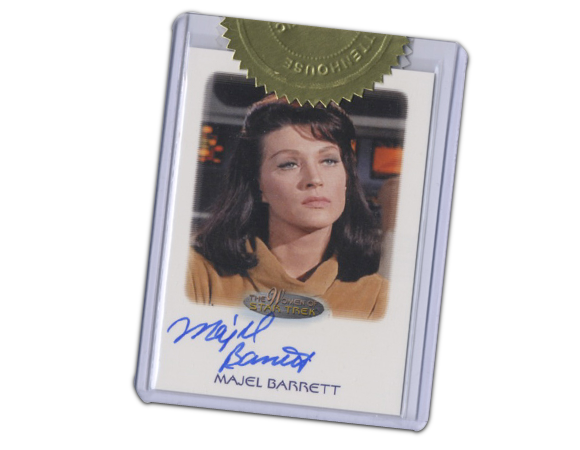
Sounds all pretty impressive, right? Well, what Siri & Apple can do, Android & Google can do better/as well/different! They’re currently working on Google Majel. For the Trekkies among you: Yes, this project is named after Majel Barrett, who supplied voice of most onboard computer interfaces throughout the Star Trek series. She also portrayed Nurse Christine Chapel in the original Star Trek series, and Lwaxana Troi on Star Trek: The Next Generation.

Fortunately we don’t have to wait until Majel gets released. There are plenty of alternatives already available in the Android Market. Here are some, in no particular order:

logo-app Skyvi (Siri for Android)
BlueTornado
Gratis   star-on-dark-imgstar-on-dark-imgstar-on-dark-imgstar-on-dark-imgstar-half-dark-img
pulsante-google-play-store
pulsante-appbrain
qrcode-app


logo-app iris.
Dexetra Software Solutions
Gratis   star-on-dark-imgstar-on-dark-imgstar-on-dark-imgstar-on-dark-imgstar-off-dark-img
pulsante-google-play-store
pulsante-appbrain
qrcode-app


logo-app Assistant
Speaktoit
Gratis   star-on-dark-imgstar-on-dark-imgstar-on-dark-imgstar-on-dark-imgstar-half-dark-img
pulsante-google-play-store
pulsante-appbrain
qrcode-app


So far I’ve only tried iris. myself, but I hope to test Skyvi & Speaktoit soon as well.

For those of you who want to see more about the capabilities of Siri I can recommend S05E14 of the Big Bang Theory. Here’s a bit of it:
(may not be 100% accurate…)

Nov 152010
 

They’ve been around for a couple of years now, and with more and more people switching over to Android & iPhone phones they’re getting more and more popular: Location-based social networking services.
Some of the better known sites at the moment are: Foursquare (4SQ), Gowalla, SCVNGR and, for people on the move, Waze. (There’s also Facebook Places, but since that’s not available yet in my area I will not be including it in this post. Others, like Loopt, do not support both Android & iPhone and are therefor not worth considering IMHO…)

First of all I would like to address the privacy issues: Apps like these allow people to see where you are/have been, and when. Potentially it also tells them the opposite: they can see when you are not at home. Luckily both Foursquare and Gowalla have good privacy settings where you can fine tune yourself what gets seen by both your friends and by the rest. I would strongly recommend limiting the visibility of your wherabouts so that only your friends can see where you are. (And choose your friends wisely. Don’t accept just any incoming friend request…)

Foursquare & Gowalla are pretty much identical. Gowalla started in 2007, Foursquare in 2009. Both are mobile web applications that allows users to check-in to locations that they visit using their mobile device.
Since they are so similar many people wonder of course which one to use, since it’s clear that on the long term probably only 1 of them will survive.
Well, that is a question I can’t answer at the moment… If I look purely at the userbase, Foursquare is the one to go for, with over 4 million users, vs. around 0.6 million for Gowalla.
But don’t write off Gowalla just yet: Disney has decided to partner with them — rather than Facebook or Foursquare — for an immersive location-based campaign to help people explore Disneyworld and Disneyland parks. Check out Gowalla’s Disney page for more on this.

Which one I am using at the moment, you might wonder? All of the above! :wink:
Yes, I have Foursquare, Gowalla, SCVNGR & Waze all installed on my phone and try to make it a habit to check in on the first 3 mentioned apps wherever I arrive, and have Waze up and running while driving to those places. (Only while riding shotgun, of course!)

Oct 182010
 

NB: Don’t miss the updated info at the bottom of this post!
**********************

Last night I decided I was going to upgrade my Samsung Galaxy S phone to Android 2.2 (aka Froyo). After installing the newest version of Kies (Kies_1.5.3.10093_82.exe) I decided to go for it.
The entire process took about 10 minutes, and went without a glitch. Android 2.2 looked nice and spiffy and has some features I’ve been longing for, like good support for Exchange 2003.

So all is fine? No, not exactly…

This morning I wanted to add another app to my phone, and discovered that the Android Market icon is no longer there! No Google App Store available! :-(

A quick Google showed me that other users, both Droid X and Galaxy S report similar problems.

I decided to contact Samsung support. Here follows the log of the chat I had with Sandra at Samsung at 06:30am:
(Sandra appears to be Swedish, so pardon her non-native English)

Sandra: Hej Evert och välkommen till Samsung Support. Du assisteras av Sandra. Hur kan jag hjälpa dig?
Evert: hi Sandra. I have a problem with my Galaxy S phone.
Sandra: Okej.
Evert: I upgraded Android to version 2.2 last night (via Kies), and now my Android Market icon is gone…
Evert: (a little Google’ing has shown me that I am not the only one with this problem…)
Evert: (everything else works just fine. Android Market is the one and only thing missing)
Sandra: Yes, you have to make a reset on the phone to be able to get all apps configured right to the new Android 2.2 system.
Evert: a reset…? Will I lose any data when doing that?
Sandra: Yes you will lose everything on mainmemory for example phonebook and downloaded apps so you have to take a backup on phonebook (sync it to Gmail or Outlook).
Evert: Is this happening to everyone who upgrades? How come it isn’t mentioned anywhere in the upgrade process?
Evert: my phonebook I have synced with Exchange, so that’s not a problem.
Evert: How about the apps. Will they all reinstall (without problems) after the reset?
Sandra: You have to download the apps again via Market.
Evert: Does the Market know/remember what I had installed? Or should I make a list of what’s on the phone before the reset?
Sandra: To be sure you can make a list. If you search for ex “Facebook” and you enter Fac.. Market remembers your searchresult from before but you can’t get a list directly in Market on what have been downloaded.
Evert: How do I perform this reset?
Sandra: You go in to: Applications – Settings – Private.
Sandra: There you have the factory reset.
Evert: Settings -> Privacy -> Factory data reset ?
Evert: I guess I’ll give it a try tonight… Is this happening to everyone? Why is there no mention of it during the upgrade process?
Sandra: Yes it is. We have forwarded this info to headquarter so they will get this info up on our homepage as soon as possible.
Evert: Good idea… You’re gonna get a lot of p*ssed off customers because of this ‘feature’… ;-)
Sandra: I think so to.
Evert: Thank you for your assistance. I’ll try it out tonight and if it does not work, you (or one of your colleagues) will ‘meet’ me again tomorrow morning! ;-)
Sandra: You do that. Thank you.
Evert: bye :)
Sandra: Bye bye

Now that’s definitely something the upgrade process should have notified me about!!

**********************
UPDATE:
Forget what Samsung says about Factory Reset. Follow these instructions instead! Don’t forget to reboot after carrying out this fix. Market kept on force-closing until I did so…

Oct 082010
 

Today I finally made the decision and retired my (still in good shape) Nokia N900 and got myself a Samsung Galaxy S at the local store.

After charging it and applying the ext4 lag fix I was good to go.
(Showing that the lagfix installed without any problems whatsoever got one of my colleagues to install it as well, by the way. He was impressed!)

I haven’t had the chance yet to play too much with it, but my first observations are that support for Exchange 2003 seems to suck, and Skype doesn’t like the Galaxy S either, for now…

Otherwise a brilliant device! :cool:
Looking forward to putting Froyo on it when/if Samsung finally releases it…

reduction
Bear
%d bloggers like this: